// project · 2025
Distributed Text Processing System
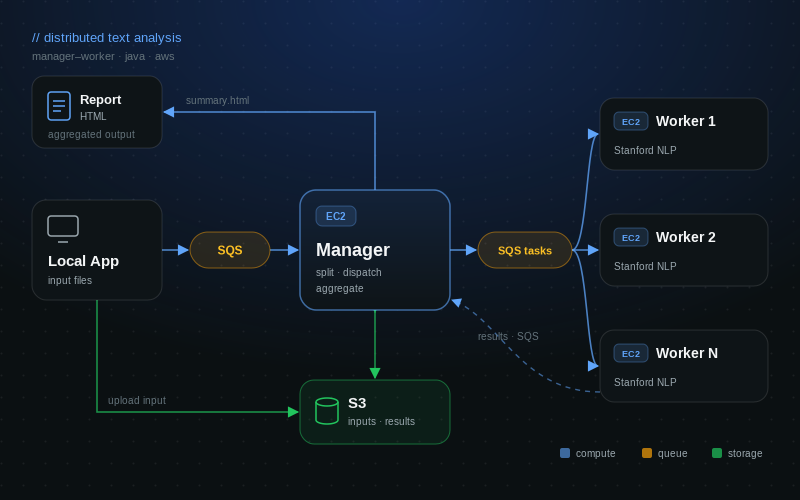
Distributed text analysis system with a manager–worker architecture: parallel processing on EC2, asynchronous messaging through SQS, and S3 storage. Integrates Stanford NLP for linguistic analysis and aggregates results into HTML reports.
- Java
- AWS EC2
- AWS SQS
- AWS S3
- Stanford NLP
// setup guide
How to run it
The system is split across three repositories that run in different places. The Local App runs on your machine and starts a Manager on EC2; the Manager launches Workers on EC2 and coordinates them through SQS, with S3 as shared storage. All three are Java 11 / Maven projects and use the us-east-1 region.
Before you start
- An AWS account with permissions for EC2, S3, and SQS
- The IAM role
EMR_EC2_DefaultRole(attached to the Manager and Worker instances) - AWS CLI configured with a
defaultprofile using temporary session credentials (access key, secret, and session token — e.g. AWS Academy oraws sts get-session-token) - Java 11 and Maven
- 1
Clone the three repositories
Put them side by side — each one builds its own JAR.
bashgit clone https://github.com/GalHalifa6/AWS_Project.git git clone https://github.com/GalHalifa6/AWS_manager.git git clone https://github.com/GalHalifa6/AWS_worker.git - 2
Create your S3 bucket
S3 bucket names are globally unique, so create your own and set it as
bucketNameinsrc/main/java/org/example/S3Service.javain all three repos (it is currentlyaws-bucket-manager-workers). Inputs go underinput/, analysis results underresults/, and HTML summaries underhtml/.bashaws s3 mb s3://<your-bucket-name> --region us-east-1 - 3
Build the JARs
Run Maven in each repo. Note that the Local App and the Worker both produce a JAR called
awsLocal-1.0.0.jar— keep track of which is which.bash(cd AWS_Project && mvn clean package) # → target/awsLocal-1.0.0.jar (Local App) (cd AWS_manager && mvn clean package) # → target/AWSManager-1.0-SNAPSHOT.jar (cd AWS_worker && mvn clean package) # → target/awsLocal-1.0.0.jar (Worker) - 4
Bake the Manager and Worker AMIs
Launch an EC2 instance (Amazon Linux 2 with Java 11 and the
EMR_EC2_DefaultRolerole), copy the JAR into/home/ec2-user/, and create an image from it. Do this once with the Manager JAR and once with the Worker JAR (plus Stanford Parser models if needed). Instances launched from these AMIs start their JAR automatically through EC2 user data.bash# Manager AMI scp -i key.pem AWS_manager/target/AWSManager-1.0-SNAPSHOT.jar ec2-user@<manager-host>:/home/ec2-user/ # Worker AMI scp -i key.pem AWS_worker/target/awsLocal-1.0.0.jar ec2-user@<worker-host>:/home/ec2-user/Never use the Manager AMI as the Worker AMI — every "worker" would start another manager and launch more machines.
- 5
Point the Local App at your AMIs
Set both AMI IDs in
AWS_Project/src/main/java/org/example/ManagerService.java, then rebuild the Local App. The Local App passes the Worker AMI to the Manager when it starts it.javastatic final String MANAGER_AMI_ID = "ami-xxxxxxxxxxxxxxxxx"; // your Manager AMI static final String WORKER_AMI = "ami-yyyyyyyyyyyyyyyyy"; // your Worker AMI - 6
Write an input file
One task per line: an analysis type, a tab, and a URL of a plain-text file. Supported types are
POS(part-of-speech tags),CONSTITUENCY(parse tree), andDEPENDENCY(word relationships).textPOS https://www.gutenberg.org/files/1659/1659-0.txt CONSTITUENCY https://www.gutenberg.org/files/1659/1659-0.txt DEPENDENCY https://www.gutenberg.org/files/1659/1659-0.txt - 7
Run it
Arguments: the input file, where to save the HTML report,
n— the maximum number of files per worker (the Manager launches about tasks ÷ n workers, up to 15) — and an optionalterminateto shut everything down when done. For reference, 9 tasks took about 10–15 minutes with n=1 (9 workers) and about 1.5 hours with n=6 (2 workers) on t1.micro instances.bashjava -jar AWS_Project/target/awsLocal-1.0.0.jar input.txt output.html 1 terminateWhen it finishes, open
output.html— a summary table linking each input URL to its analysis result in S3, with any errors listed. - 8
Shut down and clean up
With
terminate, the Manager stops accepting jobs, waits for active ones to finish, terminates all Workers, and then itself. Without it, instances keep running (and billing) — find any leftovers by theirRoletag and terminate them in the EC2 console.bashaws ec2 describe-instances --region us-east-1 \ --filters "Name=tag:Role,Values=ManagerInstance,WorkerInstance" "Name=instance-state-name,Values=running" \ --query "Reservations[].Instances[].InstanceId" --output text
Troubleshooting
Manager does not start
- →Check that
EMR_EC2_DefaultRoleexists - →Verify the Manager AMI ID
- →Check your EC2 instance limits
Workers are not processing tasks
- →Confirm Workers are running in the EC2 console
- →Check that the task queue has messages
- →Make sure the Worker JAR is in the Worker AMI
S3 uploads fail
- →Check the IAM role permissions
- →Make sure the bucket exists and
bucketNamematches in all three repos
Analysis fails
- →Verify the Stanford Parser models are available on the Worker
- →Check the input URL is reachable and the text is valid UTF-8